


Note
Go to the end to download the full example code.
Microstate Segmentation#
This tutorial introduces the concept of segmentation.
Segmentation#
We start by fitting a modified K-means
(ModKMeans) with a sample dataset. For more
details about fitting a clustering algorithm, please refer to
this tutorial.
Note
The lemon datasets used in this tutorial is composed of EEGLAB files. To
use the MNE reader mne.io.read_raw_eeglab(), the pymatreader
optional dependency is required. Use the following installation method
appropriate for your environment:
pip install pymatreaderconda install -c conda-forge pymatreader
Note that an environment created via the MNE installers includes
pymatreader by default.
Note
This tutorial uses seaborn for enhanced visualization. Use the
following installation method appropriate for your environment:
pip install seabornconda install -c conda-forge seaborn
import numpy as np
import seaborn as sns
from matplotlib import pyplot as plt
from mne.io import read_raw_eeglab

from pycrostates.cluster import ModKMeans
from pycrostates.datasets import lemon

raw_fname = lemon.data_path(subject_id="010017", condition="EC")
raw = read_raw_eeglab(raw_fname, preload=False)
raw.crop(0, 60)  # crop the dataset to speed up computation
raw.load_data()
raw.set_eeg_reference("average")  # Apply a common average reference

ModK = ModKMeans(n_clusters=5, random_state=42)
ModK.fit(raw, n_jobs=2)
ModK.reorder_clusters(order=[4, 1, 3, 2, 0])
ModK.rename_clusters(new_names=["A", "B", "C", "D", "F"])
ModK.plot()

/home/docs/checkouts/readthedocs.org/user_builds/pycrostates/checkouts/latest/tutorials/segmentation/00_segmentation.py:52: RuntimeWarning: Limited 1 annotation(s) that were expanding outside the data range.
  raw = read_raw_eeglab(raw_fname, preload=False)
/home/docs/checkouts/readthedocs.org/user_builds/pycrostates/checkouts/latest/tutorials/segmentation/00_segmentation.py:52: RuntimeWarning: The data contains 'boundary' events, indicating data discontinuities. Be cautious of filtering and epoching around these events.
  raw = read_raw_eeglab(raw_fname, preload=False)

<Figure size 1500x300 with 5 Axes>
Once a set of cluster centers has been fitted, It can be used to predict the
microstate segmentation with the method
pycrostates.cluster.ModKMeans.predict(). It returns either a
RawSegmentation or an
EpochsSegmentation depending on the object to
segment. Below, the provided instance is a continuous Raw object:
segmentation = ModK.predict(
    raw,
    reject_by_annotation=True,
    factor=10,
    half_window_size=10,
    min_segment_length=5,
    reject_edges=True,
)
The factor and half_window_size arguments control the smoothing
algorithm introduced by Pascual Marqui[1]. This
algorithm corrects wrong label assignments which occur during periods of low
signal to noise ratio. For each timepoint, it takes into account the label of
the neighboring segments to favor an assignment that increases label
continuity (i.e. long segments). The factor parameter controls the
strength of the influence of the neighboring segments while the
half_window_size parameter controls how far (in time) neighboring
segments have an influence.
A second outlier rejection algorithm can be used on top. Controlled by the
min_segment_length parameter, it re-assigns segments of short duration to
their neighboring segments.
The label of each datapoints are stored in the labels attribute.
array([-1, -1, -1, ..., -1, -1, -1], shape=(15001,))
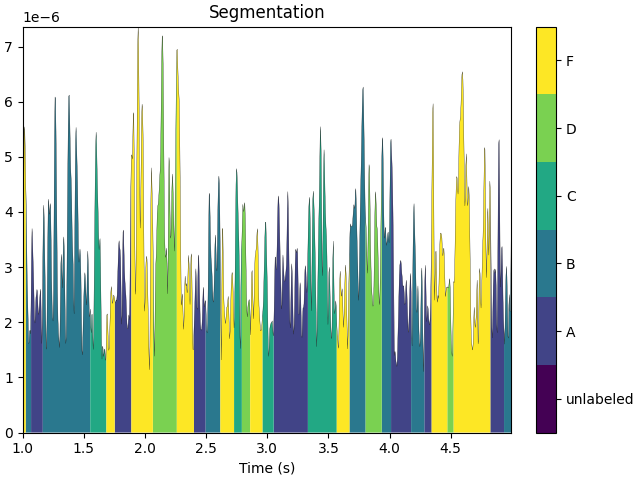
The segmentation can be visualized with the method
plot().
segmentation.plot(tmin=1, tmax=5)
plt.show()
Microstates parameters#
The usual parameters used in microstate analysis can be computed with the
method
compute_parameters(). This
method returns a dict with a key corresponding to each combination of
cluster_center name and parameter name.
{'A_mean_corr': np.float64(0.5346414252737214), 'A_gev': np.float64(0.049431508577113134), 'A_occurrences': 1.4867031939061874, 'A_timecov': np.float64(0.14947213684351196), 'A_meandurs': np.float64(0.10053932584269663), 'B_mean_corr': np.float64(0.6244742905388542), 'B_gev': np.float64(0.10880756109587916), 'B_occurrences': 1.7873847387411466, 'B_timecov': np.float64(0.20680208472537753), 'B_meandurs': np.float64(0.11570093457943927), 'C_mean_corr': np.float64(0.6855601832541897), 'C_gev': np.float64(0.2282498250281446), 'C_occurrences': 1.73727114793532, 'C_timecov': np.float64(0.245088868101029), 'C_meandurs': np.float64(0.14107692307692307), 'D_mean_corr': np.float64(0.5374672855194499), 'D_gev': np.float64(0.05464069684808019), 'D_occurrences': 1.620339436055058, 'D_timecov': np.float64(0.17098757182948016), 'D_meandurs': np.float64(0.10552577319587629), 'F_mean_corr': np.float64(0.625669782839815), 'F_gev': np.float64(0.1301698676266293), 'F_occurrences': 1.9544300414272349, 'F_timecov': np.float64(0.22764933850060137), 'F_meandurs': np.float64(0.11647863247863248), 'unlabeled': 0.0023331777881474567}
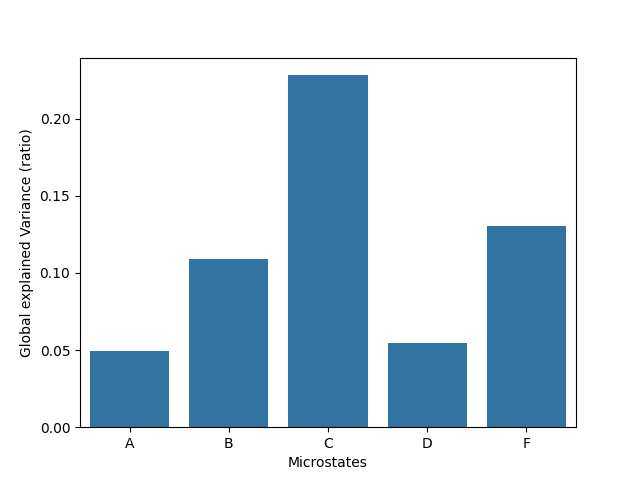
Global Explained Variance#
gev is the total explained variance expressed by a given
state. It is computed as the sum of global explained variance values of each
time point assigned to a given state.
x = ModK.cluster_names
y = [parameters[elt + "_gev"] for elt in x]

ax = sns.barplot(x=x, y=y)
ax.set_xlabel("Microstates")
ax.set_ylabel("Global explained Variance (ratio)")
plt.show()
Mean correlation#
mean_corr corresponds to the mean correlation value of each time point
assigned to a given state.
x = ModK.cluster_names
y = [parameters[elt + "_mean_corr"] for elt in x]

ax = sns.barplot(x=x, y=y)
ax.set_xlabel("Microstates")
ax.set_ylabel("Mean correlation")
plt.show()

Time coverage#
timecov corresponds to the proportion of time during which a given state
is active.
x = ModK.cluster_names
y = [parameters[elt + "_timecov"] for elt in x]

ax = sns.barplot(x=x, y=y)
ax.set_xlabel("Microstates")
ax.set_ylabel("Time Coverage (ratio)")
plt.show()

Mean durations#
meandurs corresponds to the mean temporal duration of segments assigned
to a given state.
x = ModK.cluster_names
y = [parameters[elt + "_meandurs"] for elt in x]

ax = sns.barplot(x=x, y=y)
ax.set_xlabel("Microstates")
ax.set_ylabel("Mean duration (s)")
plt.show()

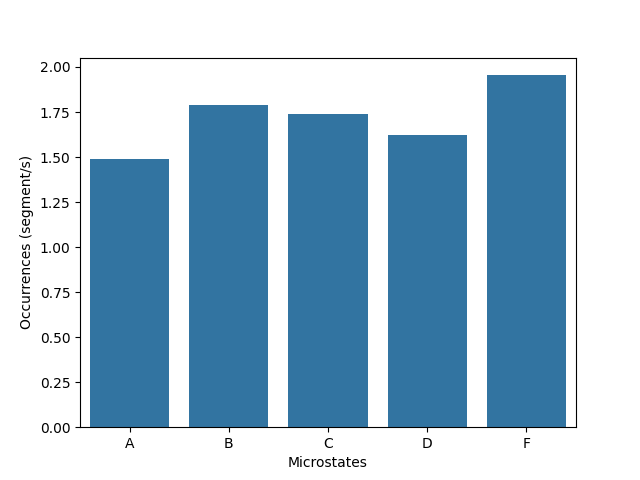
Occurrence per second#
occurrences indicates the mean number of segments assigned to a given
state per second. This metrics is expressed in segment per second.
x = ModK.cluster_names
y = [parameters[elt + "_occurrences"] for elt in x]

ax = sns.barplot(x=x, y=y)
ax.set_xlabel("Microstates")
ax.set_ylabel("Occurrences (segment/s)")
plt.show()
Distributions#
By setting return_dist=True the underlying distributions used to computed
those metrics are returned.
parameters = segmentation.compute_parameters(return_dist=True)
parameters
{'A_mean_corr': np.float64(0.5346414252737214), 'A_gev': np.float64(0.049431508577113134), 'A_occurrences': 1.4867031939061874, 'A_timecov': np.float64(0.14947213684351196), 'A_meandurs': np.float64(0.10053932584269663), 'A_dist_corr': array([ 0.46121789,  0.52395882,  0.54376569, ..., -0.77822393,
       -0.7863559 , -0.7572945 ], shape=(2237,)), 'A_dist_gev': array([4.78813181e-06, 1.18442487e-05, 1.63422005e-05, ...,
       1.15233123e-05, 9.85485151e-06, 1.23715453e-05], shape=(2237,)), 'A_dist_durs': array([0.096, 0.136, 0.096, 0.28 , 0.164, 0.06 , 0.112, 0.044, 0.148,
       0.076, 0.064, 0.08 , 0.104, 0.092, 0.052, 0.096, 0.056, 0.084,
       0.068, 0.048, 0.052, 0.108, 0.072, 0.044, 0.06 , 0.128, 0.1  ,
       0.14 , 0.064, 0.076, 0.056, 0.116, 0.212, 0.18 , 0.06 , 0.08 ,
       0.052, 0.104, 0.06 , 0.064, 0.16 , 0.052, 0.08 , 0.104, 0.084,
       0.044, 0.168, 0.176, 0.056, 0.052, 0.084, 0.068, 0.052, 0.232,
       0.096, 0.056, 0.064, 0.104, 0.168, 0.096, 0.088, 0.056, 0.056,
       0.056, 0.104, 0.072, 0.076, 0.052, 0.08 , 0.164, 0.312, 0.148,
       0.104, 0.06 , 0.068, 0.08 , 0.136, 0.076, 0.276, 0.216, 0.068,
       0.08 , 0.06 , 0.108, 0.12 , 0.064, 0.112, 0.204, 0.072]), 'B_mean_corr': np.float64(0.6244742905388542), 'B_gev': np.float64(0.10880756109587916), 'B_occurrences': 1.7873847387411466, 'B_timecov': np.float64(0.20680208472537753), 'B_meandurs': np.float64(0.11570093457943927), 'B_dist_corr': array([0.39588089, 0.48685777, 0.53990163, ..., 0.29996699, 0.30217753,
       0.37320483], shape=(3095,)), 'B_dist_gev': array([5.39912177e-06, 8.85977991e-06, 1.06100313e-05, ...,
       4.14797890e-06, 6.61139792e-06, 1.20001971e-05], shape=(3095,)), 'B_dist_durs': array([0.144, 0.236, 0.044, 0.388, 0.12 , 0.132, 0.076, 0.108, 0.136,
       0.176, 0.4  , 0.06 , 0.36 , 0.184, 0.108, 0.048, 0.16 , 0.064,
       0.096, 0.092, 0.076, 0.104, 0.08 , 0.104, 0.064, 0.08 , 0.308,
       0.088, 0.092, 0.076, 0.156, 0.072, 0.116, 0.16 , 0.072, 0.1  ,
       0.088, 0.156, 0.116, 0.076, 0.056, 0.064, 0.06 , 0.116, 0.072,
       0.144, 0.12 , 0.076, 0.084, 0.072, 0.088, 0.112, 0.084, 0.172,
       0.064, 0.256, 0.132, 0.16 , 0.128, 0.132, 0.212, 0.096, 0.072,
       0.124, 0.088, 0.064, 0.064, 0.072, 0.236, 0.176, 0.056, 0.112,
       0.112, 0.052, 0.06 , 0.072, 0.208, 0.064, 0.18 , 0.164, 0.148,
       0.136, 0.068, 0.104, 0.1  , 0.04 , 0.072, 0.112, 0.064, 0.192,
       0.064, 0.076, 0.048, 0.08 , 0.292, 0.1  , 0.068, 0.1  , 0.044,
       0.072, 0.096, 0.124, 0.072, 0.052, 0.092, 0.104, 0.068]), 'C_mean_corr': np.float64(0.6855601832541897), 'C_gev': np.float64(0.2282498250281446), 'C_occurrences': 1.73727114793532, 'C_timecov': np.float64(0.245088868101029), 'C_meandurs': np.float64(0.14107692307692307), 'C_dist_corr': array([-0.75398016, -0.79462083, -0.77615933, ...,  0.91183077,
        0.88752534,  0.85336098], shape=(3668,)), 'C_dist_gev': array([9.62107886e-06, 1.07964953e-05, 7.73967640e-06, ...,
       1.22361899e-04, 1.34220541e-04, 1.31921192e-04], shape=(3668,)), 'C_dist_durs': array([0.156, 0.088, 0.132, 0.064, 0.092, 0.236, 0.112, 0.348, 0.12 ,
       0.2  , 0.096, 0.06 , 0.092, 0.084, 0.192, 0.08 , 0.244, 0.16 ,
       0.076, 0.384, 0.124, 0.096, 0.104, 0.12 , 0.172, 0.16 , 0.084,
       0.048, 0.052, 0.144, 0.068, 0.128, 0.044, 0.168, 0.128, 0.064,
       0.196, 0.068, 0.16 , 0.14 , 0.052, 0.084, 0.104, 0.164, 0.076,
       0.212, 0.064, 0.104, 0.096, 0.132, 0.12 , 0.108, 0.088, 0.056,
       0.348, 0.06 , 0.236, 0.064, 0.124, 0.16 , 0.052, 0.072, 0.056,
       0.808, 0.092, 0.072, 0.052, 0.132, 0.048, 0.072, 0.192, 0.052,
       0.112, 0.12 , 0.428, 0.152, 0.092, 0.076, 0.316, 0.156, 0.156,
       0.06 , 0.124, 0.176, 0.112, 0.196, 0.056, 0.724, 0.156, 0.196,
       0.044, 0.1  , 0.104, 0.364, 0.232, 0.044, 0.1  , 0.104, 0.128,
       0.204, 0.044, 0.048, 0.184, 0.128]), 'D_mean_corr': np.float64(0.5374672855194499), 'D_gev': np.float64(0.05464069684808019), 'D_occurrences': 1.620339436055058, 'D_timecov': np.float64(0.17098757182948016), 'D_meandurs': np.float64(0.10552577319587629), 'D_dist_corr': array([-0.54319309, -0.70981071, -0.73585997, ...,  0.67774271,
        0.60101256,  0.47999274], shape=(2559,)), 'D_dist_gev': array([3.20283960e-06, 8.82749548e-06, 1.65314024e-05, ...,
       1.46932839e-05, 7.62252649e-06, 3.72550043e-06], shape=(2559,)), 'D_dist_durs': array([0.108, 0.196, 0.068, 0.132, 0.052, 0.056, 0.056, 0.096, 0.076,
       0.08 , 0.12 , 0.136, 0.068, 0.128, 0.488, 0.088, 0.044, 0.08 ,
       0.06 , 0.06 , 0.112, 0.08 , 0.192, 0.188, 0.128, 0.048, 0.1  ,
       0.188, 0.108, 0.096, 0.112, 0.044, 0.104, 0.08 , 0.072, 0.064,
       0.072, 0.12 , 0.072, 0.092, 0.112, 0.152, 0.072, 0.18 , 0.128,
       0.108, 0.044, 0.112, 0.064, 0.16 , 0.084, 0.104, 0.132, 0.084,
       0.068, 0.168, 0.12 , 0.076, 0.124, 0.12 , 0.088, 0.052, 0.112,
       0.052, 0.056, 0.044, 0.192, 0.112, 0.084, 0.136, 0.08 , 0.104,
       0.064, 0.128, 0.2  , 0.052, 0.112, 0.068, 0.048, 0.056, 0.052,
       0.092, 0.08 , 0.06 , 0.056, 0.108, 0.096, 0.436, 0.084, 0.108,
       0.152, 0.08 , 0.06 , 0.076, 0.072, 0.192, 0.116]), 'F_mean_corr': np.float64(0.625669782839815), 'F_gev': np.float64(0.1301698676266293), 'F_occurrences': 1.9544300414272349, 'F_timecov': np.float64(0.22764933850060137), 'F_meandurs': np.float64(0.11647863247863248), 'F_dist_corr': array([0.78013258, 0.49291192, 0.37530039, ..., 0.62120228, 0.59793133,
       0.54647673], shape=(3407,)), 'F_dist_gev': array([1.01064927e-05, 3.95582659e-06, 2.93982673e-06, ...,
       3.70567777e-05, 3.25952585e-05, 2.52818999e-05], shape=(3407,)), 'F_dist_durs': array([0.072, 0.144, 0.068, 0.176, 0.14 , 0.112, 0.1  , 0.104, 0.128,
       0.3  , 0.064, 0.08 , 0.064, 0.048, 0.216, 0.148, 0.084, 0.116,
       0.084, 0.104, 0.064, 0.08 , 0.044, 0.084, 0.096, 0.044, 0.044,
       0.072, 0.076, 0.108, 0.116, 0.116, 0.16 , 0.072, 0.112, 0.12 ,
       0.092, 0.048, 0.068, 0.084, 0.088, 0.508, 0.056, 0.076, 0.104,
       0.316, 0.12 , 0.088, 0.364, 0.124, 0.06 , 0.196, 0.108, 0.092,
       0.06 , 0.1  , 0.168, 0.196, 0.096, 0.08 , 0.068, 0.1  , 0.08 ,
       0.16 , 0.1  , 0.048, 0.128, 0.14 , 0.088, 0.072, 0.06 , 0.196,
       0.088, 0.16 , 0.284, 0.288, 0.08 , 0.12 , 0.136, 0.08 , 0.072,
       0.092, 0.096, 0.22 , 0.104, 0.064, 0.068, 0.08 , 0.056, 0.104,
       0.084, 0.104, 0.124, 0.08 , 0.092, 0.08 , 0.04 , 0.268, 0.084,
       0.324, 0.1  , 0.072, 0.064, 0.068, 0.104, 0.168, 0.06 , 0.132,
       0.088, 0.08 , 0.112, 0.172, 0.156, 0.072, 0.072, 0.276, 0.068]), 'unlabeled': 0.0023331777881474567}
For example, the distribution of C segment durations can be plotted.
sns.displot(parameters["C_dist_durs"], stat="probability", bins=30)
plt.show()

Or it can be used to compute other custom metrics from the segmentation. For instance, the median.
median = np.median(parameters["C_dist_durs"])
print(f"Microstate C segments have a median duration of {median:.2f}s.")
Microstate C segments have a median duration of 0.11s.
Transition probabilities#
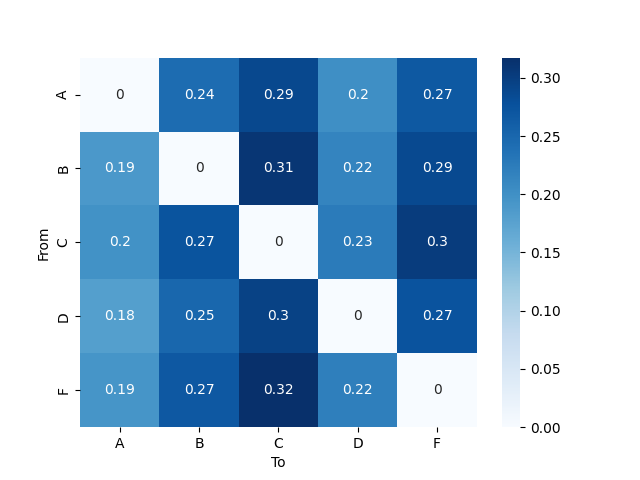
The obsered transition probabilities (T) can be retrieved with the method
compute_transition_matrix().
This method returns a array of shape (n_clusters, n_clusters)
containing the value corresponding to the chosen statistic:
countwill return the number of transitions observed.probabilityandproportionwill both return the normalized transition probability.percentwill return the normalized transition probability as a percentage.
The rows of T correspond to the "from" state while the columns
correspond to the "to" state.
Note
array are 0-indexed, thus T[1, 2] encodes the transition
from the second to the third state (B to C in this tutorial).
Note
The transition from and to unlabeled segments are ignored and
not taken into account during normalization.
ax = sns.heatmap(
    T_observed,
    annot=True,
    cmap="Blues",
    xticklabels=segmentation.cluster_names,
    yticklabels=segmentation.cluster_names,
)
ax.set_ylabel("From")
ax.set_xlabel("To")
plt.show()

It is however important to take into account the time coverage of each microstate in order to interpret this matrix. The more a state is present, the more there is a chance that a transition towards this state is observed without reflecting any particular dynamics in state transitions.
pycrostates has the possibility to generate a theoretical transition
matrix for a given segmentation with the method
compute_expected_transition_matrix().
This transition matrix is based on segments counts of each state present in
the segmentation but ignores the temporal dynamics (effectively randomizing
the transition order).
T_expected = segmentation.compute_expected_transition_matrix()
ax = sns.heatmap(
    T_expected,
    annot=True,
    cmap="Blues",
    xticklabels=segmentation.cluster_names,
    yticklabels=segmentation.cluster_names,
)
ax.set_ylabel("From")
ax.set_xlabel("To")
plt.show()
The difference between the observed transition probability matrix
T_observed and the theoretical transition probability matrix
T_expected reveals particular dynamic present in the segmentation.
Here we observe that the transition from state B to state A appears
in larger proportion than expected while the transition from state B to
state C is less observed than expected.
ax = sns.heatmap(
    T_observed - T_expected,
    annot=True,
    cmap="RdBu_r",
    vmin=-0.15,
    vmax=0.15,
    xticklabels=segmentation.cluster_names,
    yticklabels=segmentation.cluster_names,
)
ax.set_ylabel("From")
ax.set_xlabel("To")
plt.show()

References#
Total running time of the script: (0 minutes 26.665 seconds)
Estimated memory usage: 231 MB